Lesson 17: DAW Introduction 1 / 11
100%

DAW Introduction

Introducción al DAW
Your Music Studio on a Screen
Tu Estudio Musical en una Pantalla
Monday, March 2, 2026 • General Music • Mr. Mbagwu
Unit 4: Music Technology & Production
← L16: Recording Evolution
DO NOW 5 Minutes
05:00
Soundtrap DAW Workspace — Your teacher's actual Soundtrap screen Soundtrap DAW Workspace — Full project view with tracks and loops
Click either image to enlarge • Label at least 3 things you see

Name That Tool

Nombra Esa Herramienta
Look at the screen on the SmartBoard. It shows a DAW — the software music producers use.

On your paper, label at least 3 things you notice on the screen.

What do you THINK each section does? No wrong answers — just observe and guess.
Mira la pantalla en el SmartBoard. Muestra un DAW — el software que usan los productores musicales.
En tu papel, etiqueta al menos 3 cosas que notes en la pantalla.
¿Qué CREES que hace cada sección? No hay respuestas incorrectas — solo observa y adivina.

I Can…

What Is a DAW?

¿Qué Es un DAW?

Digital Audio Workstation

Estación de Trabajo de Audio Digital
Software that turns your computer into a complete recording studio
Everything a professional studio does — recording, editing, mixing, adding effects — a DAW can do on a screen.

This is the tool that made bedroom producers possible. The same basic tools that cost $100,000+ in the 1990s are now free.
Soundtrap 2.0 Interface — A complete recording studio on your screen
Click to enlarge — This is Soundtrap, the free DAW we’ll use in class

Free DAWs You Can Use TODAY

Soundtrap — free, browser-based, works on Chromebooks (owned by Spotify)

BandLab — free, browser-based, 50M+ users

GarageBand — free on Apple devices. Steve Lacy recorded on his iPhone!

Audacity — free, open-source. Best for recording/editing.

The Car Analogy

Free DAW vs. $500 DAW is like a Honda vs. Ferrari — the Ferrari is faster with more features, but both get you where you need to go. Start free. Upgrade when you outgrow it.

Inside a DAW — Key Components

Dentro de un DAW — Componentes Clave

Tracks

Pistas
Soundtrap Tracks — Each row is one instrument or voice

Each row = one instrument or voice. You can have 10, 50, even 100 tracks — all on your laptop.

Cada fila = un instrumento o voz. Puedes tener 10, 50, hasta 100 pistas — todo en tu laptop.
Real world: Each microphone in a studio
Mundo real: Cada micrófono en un estudio

Timeline

Línea de Tiempo
Soundtrap Timeline — Time flows left to right with automation curves

Left to right = time passing. You can see exactly where each sound happens and edit it.

De izquierda a derecha = el tiempo pasando. Puedes ver exactamente dónde ocurre cada sonido y editarlo.
Real world: Recording tape rolling through a machine
Mundo real: Cinta de grabación pasando por una máquina

Transport

Transporte
Soundtrap Transport Controls — Play, Stop, Record buttons at the top center

Play, Stop, Record, Rewind. The basic controls for playback and recording.

Reproducir, Parar, Grabar, Rebobinar. Los controles básicos para reproducción y grabación.
Real world: Buttons on a tape recorder
Mundo real: Botones en una grabadora de cinta
🎵

Loops

Bucles
Soundtrap Loop Library — Pre-made sound packs to drag and drop

Pre-made musical phrases (drum patterns, bass lines) you drag and drop onto your timeline.

Frases musicales prefabricadas (patrones de batería, líneas de bajo) que arrastras y sueltas en tu línea de tiempo.
Real world: A musician playing the same pattern perfectly every time
Mundo real: Un músico tocando el mismo patrón perfectamente cada vez
🎸

Virtual Instruments

Instrumentos Virtuales
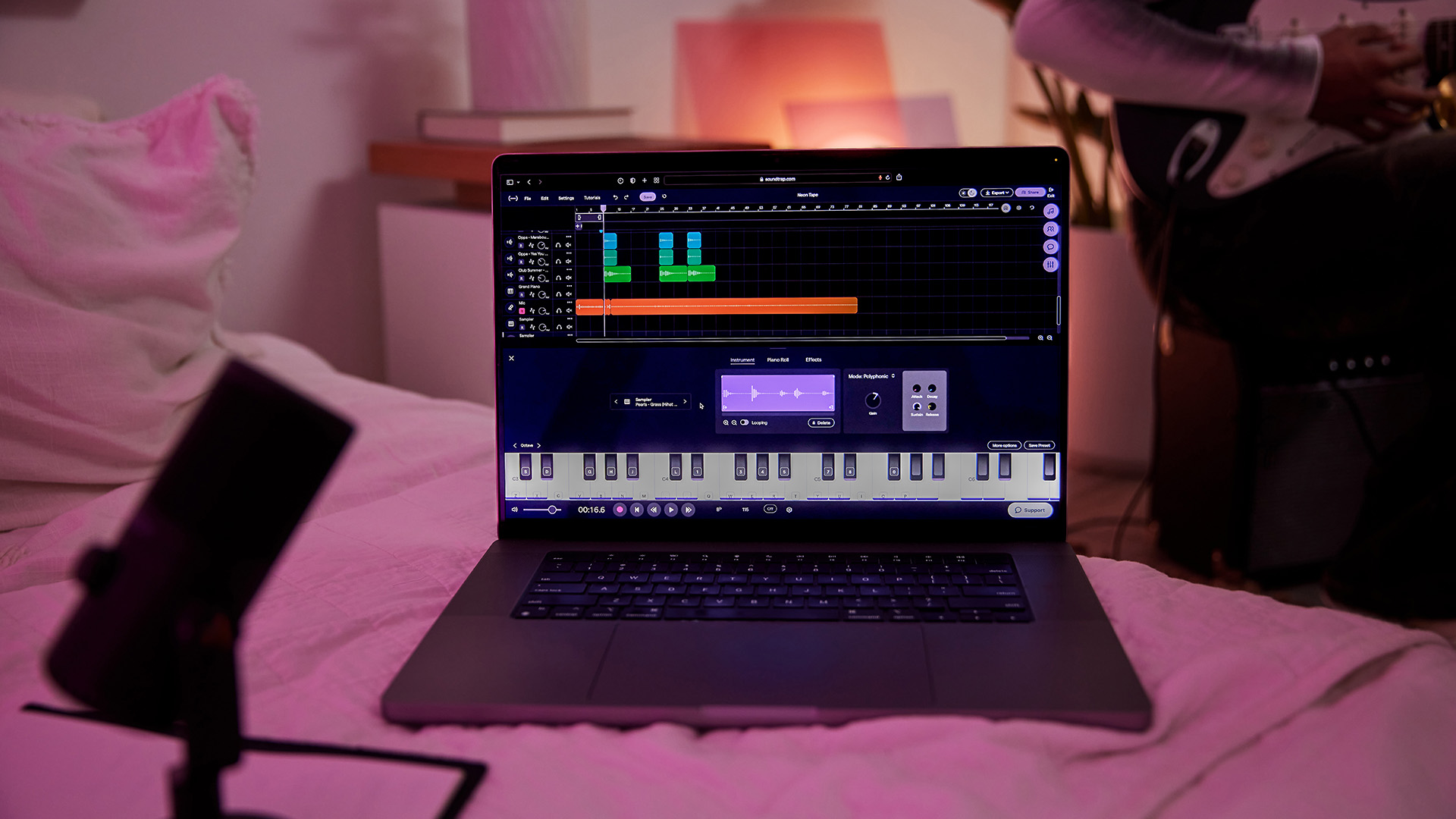
Soundtrap Virtual Instruments — Keyboards, synths, and drum pads on screen

On-screen keyboards, drum pads, synthesizers. Play them with mouse, keyboard, or MIDI controller.

Teclados en pantalla, pads de batería, sintetizadores. Tócalos con mouse, teclado o controlador MIDI.
Real world: Every instrument in the world, inside your computer
Mundo real: Cada instrumento del mundo, dentro de tu computadora
🎦

Mixer

Mezclador
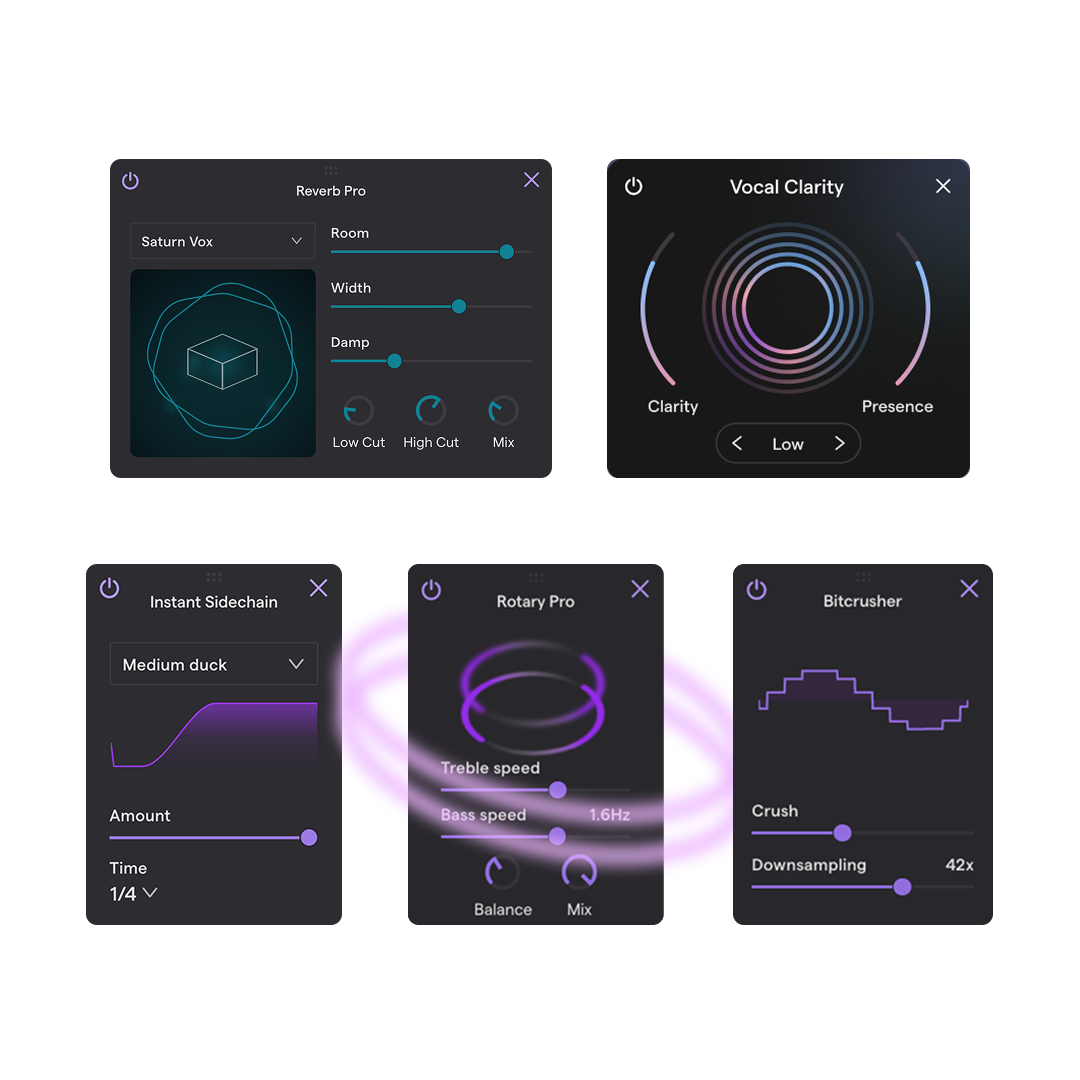
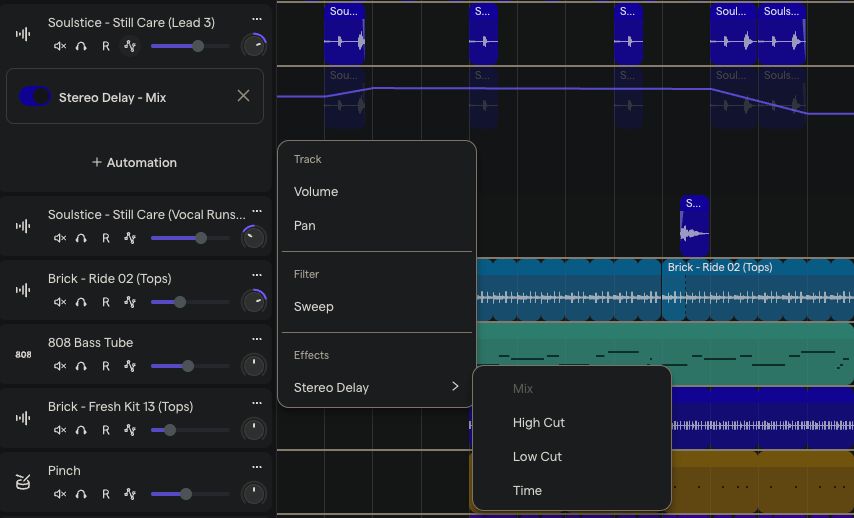
Soundtrap Mixer — Adjust volume, panning, and effects for each track

Adjust volume, panning (left/right speaker), and effects for each track independently.

Ajusta volumen, paneo (altavoz izquierdo/derecho) y efectos para cada pista de forma independiente.
Real world: The mixing console from L6 Sound Engineering
Mundo real: La consola de mezcla de L6 Ingeniería de Sonido

Effects

Efectos
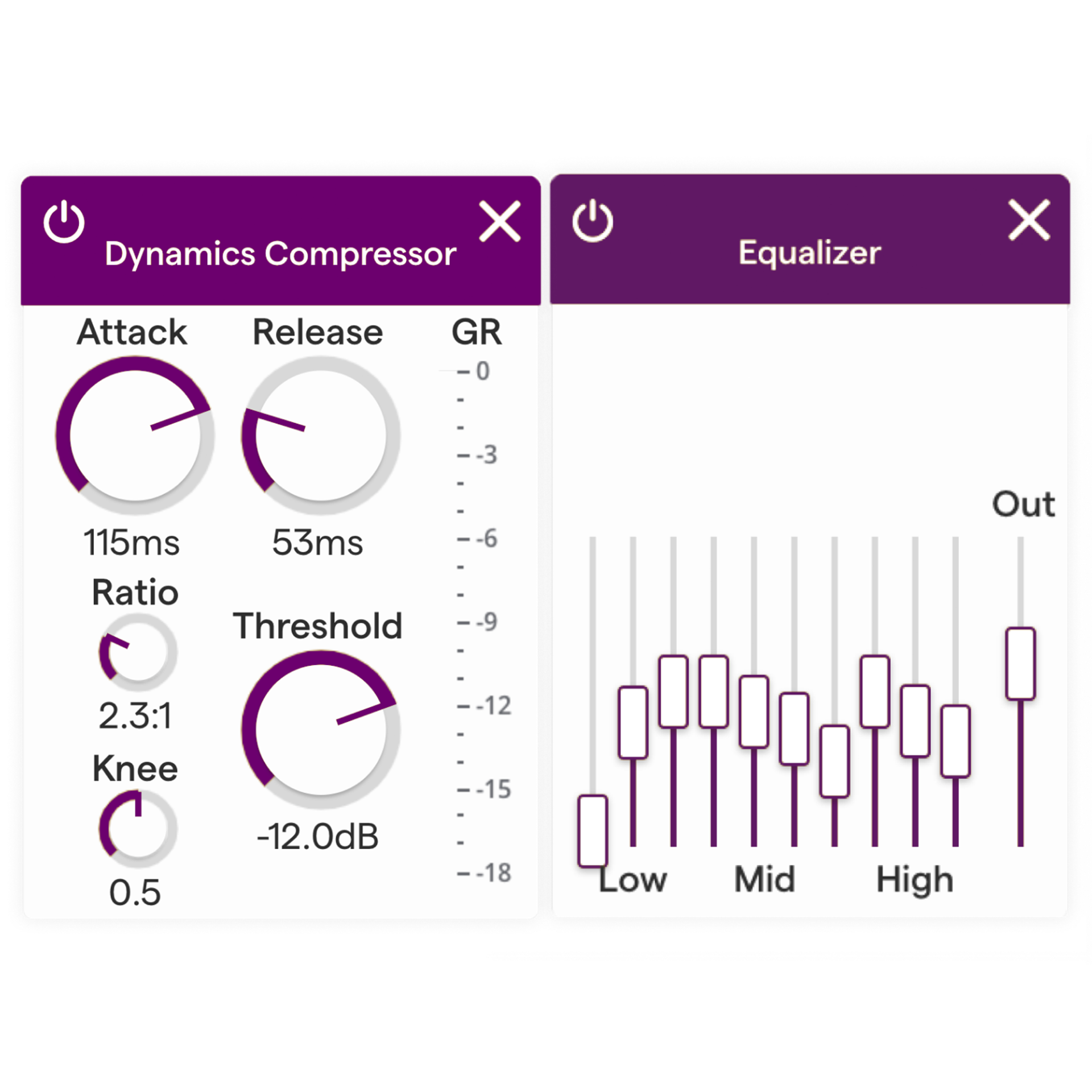
Soundtrap EQ and Compressor — Professional effects built into the software

Reverb, EQ, Compression, Delay. Same effects used in pro studios, built into the software.

Reverberación, EQ, Compresión, Delay. Los mismos efectos usados en estudios profesionales, integrados en el software.
Real world: Outboard gear rack in a pro studio
Mundo real: Rack de equipo externo en un estudio profesional

BPM

BPM (Pulsaciones Por Minuto)
Soundtrap BPM Setting — Set your tempo from slow ballad to fast EDM

Beats Per Minute = tempo. 60=ballad, 90=hip-hop, 120=pop, 140+=EDM/dance.

Pulsaciones Por Minuto = tempo. 60=balada, 90=hip-hop, 120=pop, 140+=EDM/dance.
Real world: A metronome keeping time
Mundo real: Un metrónomo manteniendo el tempo
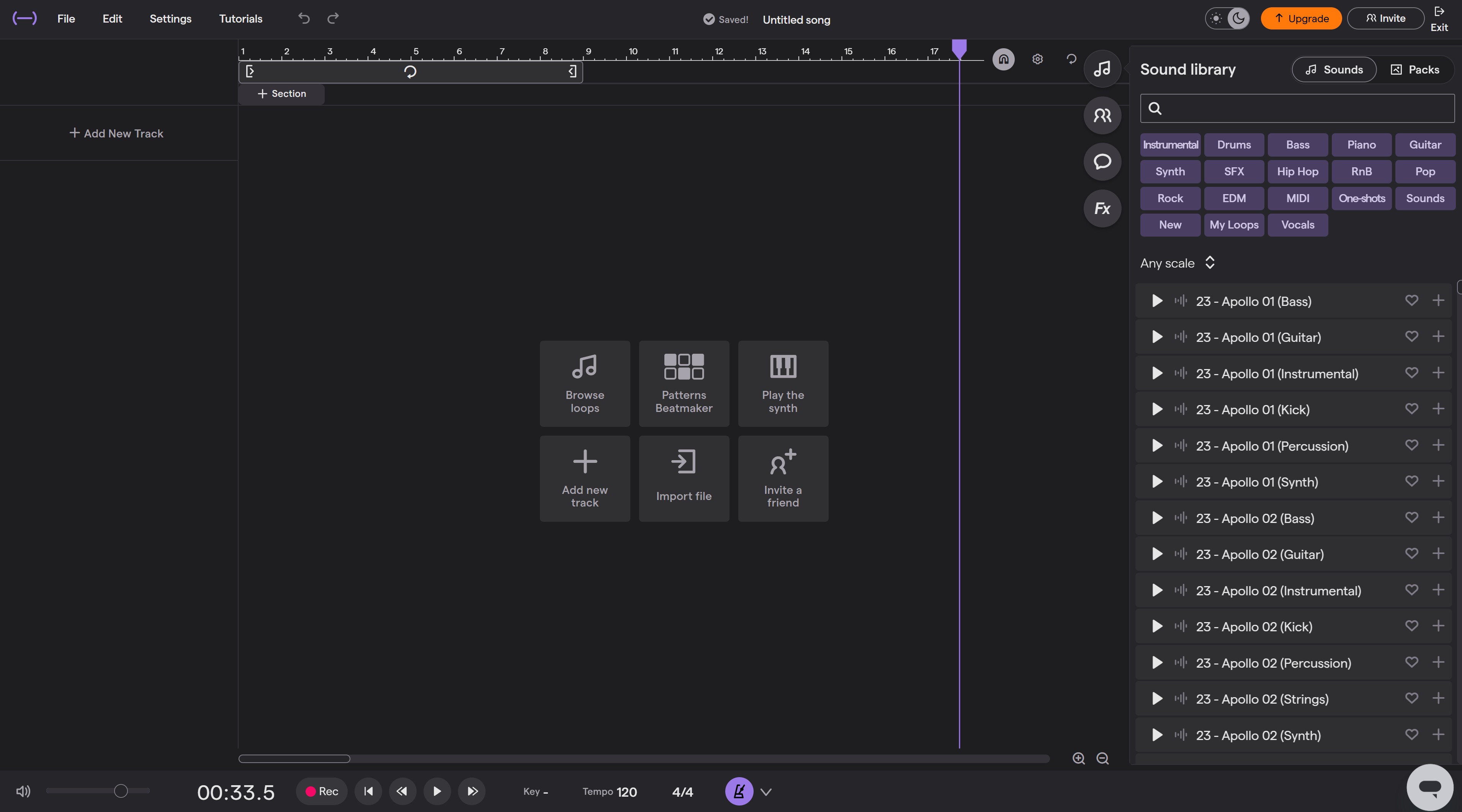
Building a Beat in Soundtrap — 3 Minutes

Demo Steps (Teacher)

1
Open Soundtrap → New Project → Music Maker
2
Show the TRACKS area — point out each row
3
Open LOOP library → drag a drum loop onto Track 1
4
Hit PLAY → “That’s a drum pattern. One click.”
5
Add a bass loop on Track 2. Play → “Drums AND bass.”
6
Open Virtual Instrument (keyboard) → play a melody
7
Show MIXER → adjust volumes. Add reverb to melody.
8
“We just built a beat in 3 minutes. This is what producers do every day.”
Soundtrap Workspace — This is what you see when you open a new project
Steps 1-2: Open Soundtrap & see the tracks area
Soundtrap Loop Library — Drag loops onto your tracks
Step 3: Open the loop library & drag patterns
Soundtrap Virtual Instrument — Play melodies with on-screen keyboard
Step 6: Open a virtual instrument
Soundtrap Mixer — Adjust levels and add effects
Step 7: Open the mixer & add reverb

Key Point

“This is what Young Guru uses when he mixes Jay-Z. What Tainy uses for Bad Bunny. The professional version costs more, but the FREE version has the same basic tools.”

If Soundtrap Doesn’t Load

Use the screenshots on this slide and the video on the next slide to explain components. The concepts are what matter — we’ll get hands-on time later in the unit.

Navigating Soundtrap — A Beginner’s Tour

Navegando Soundtrap — Un Tour para Principiantes

Video requires internet connection

▶ Open on YouTube

How to Navigate the Studio

Source: Soundtrap for Education (Official)
Duration: First 5 min (auto-clipped)
About: Official Soundtrap tutorial showing how to navigate the studio interface — tracks, loops, instruments, and transport controls
Watch for: Each component we just learned about — can you spot the tracks, timeline, loops, and virtual instruments?
As you watch, match what you see to the 8 components from Slide 4!
Mientras miras, conecta lo que ves con los 8 componentes de la Diapositiva 4.

Famous Producers and Their DAWs

Productores Famosos y Sus DAWs

Young Guru

Jay-Z’s Engineer

Mixed & engineered most of Jay-Z’s discography including The Blueprint and 4:44. Teaches at NYU Tisch.

DAW: Pro Tools
Tainy

Tainy

Bad Bunny’s Producer

Produced “Callaita,” “Dakiti,” and much of Bad Bunny’s catalog. Grammy-winning reggaeton/Latin trap producer.

DAW: FL Studio

Metro Boomin

Hip-Hop Super Producer

Produced hits for Future, 21 Savage, Travis Scott. Started making beats at age 13 in his bedroom in St. Louis.

DAW: FL Studio
Finneas O'Connell

Finneas

Billie Eilish’s Brother

Produced “When We All Fall Asleep” — 5 Grammys including Album of the Year. Recorded in his bedroom.

DAW: Logic Pro ($200)

Steve Lacy

Singer-Producer

You know “Bad Habit”? He recorded parts of his debut album on GarageBand — on his iPhone.

DAW: GarageBand (FREE)
Skrillex at SXSW 2012

Skrillex

EDM Pioneer

8-time Grammy winner. Pioneered dubstep and EDM production. Known for live performance integration.

DAW: Ableton Live

Notice: Two of these producers use the same DAW (FL Studio). One used a FREE app on his phone. The tool matters less than the talent and creativity behind it.

DAW Decoder Worksheet — 15 Minutes

Hoja de Trabajo: Decodificador de DAW — 15 Minutos
15:00

Your Worksheet: DAW Decoder

  1. 1Part 1 — Label the DAW: Match the correct term to each numbered description from the word bank
  2. 2Part 2 — Real World Match: Connect each DAW feature to its physical studio equivalent
  3. 3Part 3 — Beat Blueprint: Design a 4-bar beat on the grid. Mark where kick, snare, hi-hat, bass, and melody go. Describe your beat’s mood/genre.
Stuck on the beat blueprint? We’ll do Bar 1 together as a class. Use your DAW Reference Guide!
📚 Submit on Google Classroom
EXIT TICKET 6 Points • Classwork (40%)
08:00
Q1 — Knowledge & Connection (3 Points)

What does DAW stand for, and why is it important that many DAWs are free or low-cost? Connect your answer to what we learned about the recording evolution.

¿Qué significa DAW, y por qué es importante que muchos DAWs sean gratis o de bajo costo? Conecta tu respuesta con lo que aprendimos sobre la evolución de la grabación.

3 pts: Defines DAW correctly AND connects free access to recording evolution

2 pts: Defines DAW but connection weak

1 pt: Partial definition, no connection

Q2 — Critical Thinking (3 Points)

A scholar says: “Real musicians don’t need computers — they just play instruments.” Write a response that agrees, disagrees, or finds a middle ground. Support with at least ONE specific DAW feature.

Un estudiante dice: “Los músicos de verdad no necesitan computadoras — solo tocan instrumentos.” Escribe una respuesta que esté de acuerdo, en desacuerdo, o encuentre un punto medio. Apoya con al menos UNA característica específica del DAW.

3 pts: Clear position with specific DAW feature as evidence

2 pts: Position stated but no specific feature

1 pt: Opinion only

Multiple means of expression: Written • Verbal share with Mr. Mbagwu • Audio recording
📚 Submit on Google Classroom

Coming Up Next

Next: Hip-Hop Genre Project — Create your own Hip-Hop beat in Soundtrap!
The tools are free. The knowledge is here. The only thing missing is your creativity.
“I can do all things through Christ who strengthens me.”
— Philippians 4:13
← L16: Recording EvolutionL18: Hip-Hop Genre Project →
×
navigate • F fullscreen • + zoom • Click images to enlarge